Portal17 Studio

Portal17 Studio

Click Once. Run Forever.

Build browser automations by dragging nodes onto a canvas — or just click through the task once and let Portal17 Studio record it for you. Then run it once, on a schedule, or headless forever. No coding required.

🪟 Windows 10 / 11 🌐 9 languages 🧩 46 node types 🖥️ Browser + desktop apps 🔒 100% local — nothing in the cloud

A few of the 46 node types you can drop onto the canvas.

Everything you need

Automation that reads like a flowchart

Every feature below shipped because a real, repetitive browser task needed it.

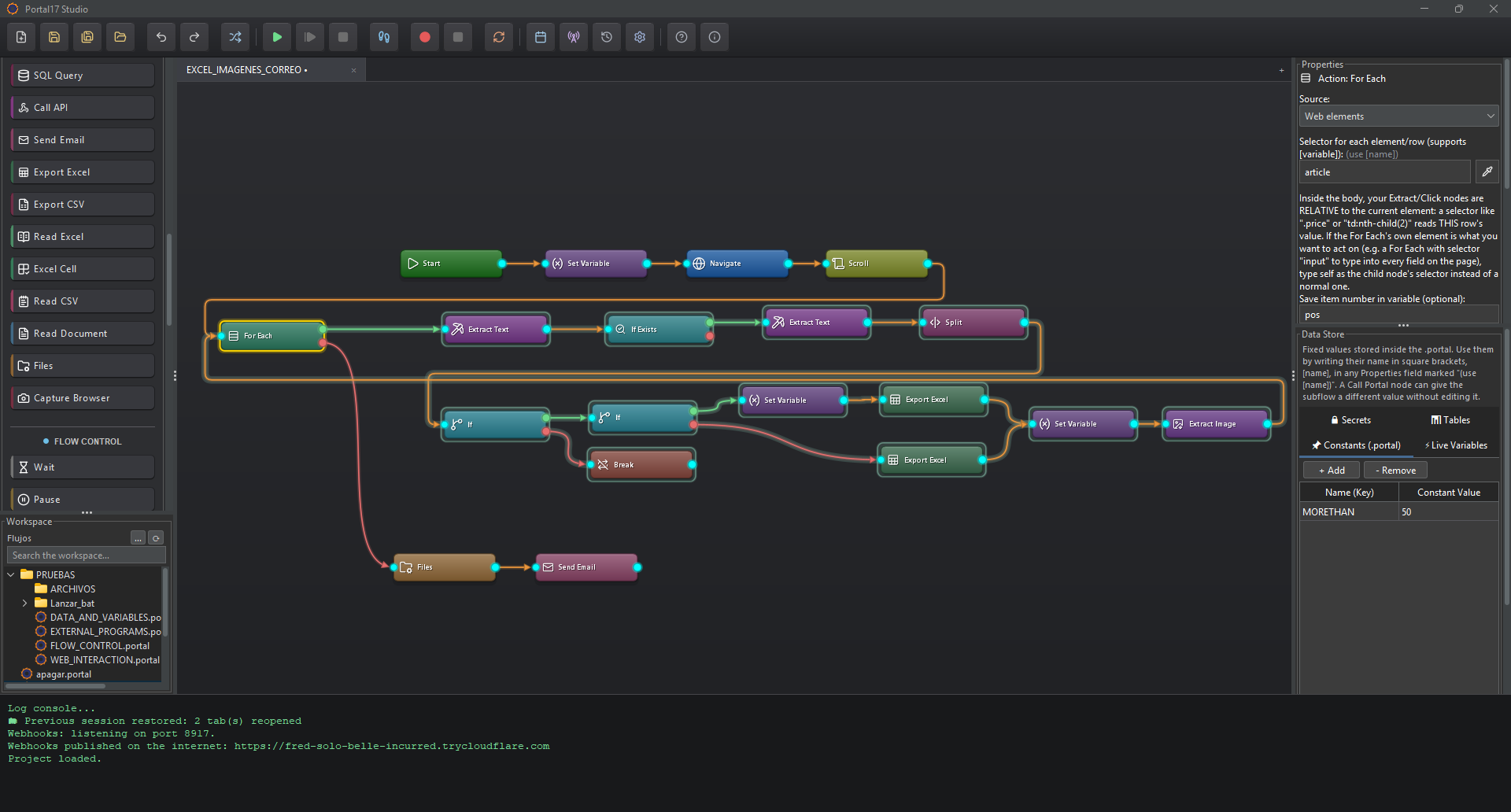
Visual Flow Builder

Drag nodes onto a canvas and wire them together — no coding, just building blocks.

Smart Recorder

Click through your task once and Portal17 Studio writes the flow for you automatically.

Branching & Loops

If/Else, If Exists, multi-way Switch, loops with exit conditions, and For Each over every element that matches a selector — scraping a whole product list is one loop.

Database Queries

Pull data straight from PostgreSQL or SQL Server out of the box — or plug in the driver for MySQL, Oracle, or any other JDBC database yourself.

Call REST APIs

Fetch data from any HTTP API and pull fields straight out of the JSON into variables — the dependable way to get data when a site blocks scraping.

Excel & CSV Export

Capture values as you go, reuse them anywhere in the flow, and build up a real Excel (.xlsx) or CSV file row by row as your loop runs.

Clean & Transform Data

Scraped text is messy. Trim it, change case, extract the number out of "1.234,50 €", replace with regex, or reformat dates — one node, no code.

Run JavaScript

The escape hatch for everything else: run a JS snippet on the page and save what it returns into a variable — read attributes, count elements, compute anything.

Encrypted Secrets

Keep passwords and API keys encrypted on your machine and reference them as [secret:name] — share a flow file without ever leaking a credential.

Beyond the Browser

Launch a desktop program, wait for its window, click a screen position, and send it keystrokes.

Groups & Sticky Notes

Organize big flows into collapsible groups and leave yourself sticky notes as you go.

Parameterized Scheduler

Run a saved flow automatically at a set time — even while Portal17 Studio is closed. Override a flow's constants per task, so the same flow runs at 8:00 for Madrid and 9:00 for Barcelona.

Three steps

From idea to “it just runs”

The same loop, whether you're filling one form or scraping a thousand rows.

1

Build or Record

Drag nodes onto the canvas, or click through the task once and let the recorder do the typing.

2

Connect & Configure

Wire nodes together, add branches and loops, capture values into variables.

3

Run — Forever

Run it now, on a schedule, or headless from the command line. Click once, run forever.

Try it yourself Live demo

The Playground

This is a live simulation running entirely in your browser — a "Hello World" flow that opens a contact form, fills it in, submits it, and extracts the confirmation message. It's exactly the sequence the real app follows on a real page. Hit Run Flow and watch it happen.

Flow — Hello World
Start
Every flow begins here. Nothing runs before this node fires.
Navigate
Opens the target page — here, our demo contact form.
Type
Types the name into the Name field, one character at a time.
Type
Types the email address into the Email field.
Select
Picks an option from the Topic dropdown.
Type
Types the message into the Message field.
Click
Presses the Send message button and waits for the page to respond.
Extract Text
Reads the ticket number from the confirmation into a variable — one Extract Text node captures one value.
  1. Start — the flow is launched.
  2. Navigate — the demo page below opens.
  3. Type / Select — name, email, topic and message get filled in, field by field.
  4. Click — the Send button is pressed like a real visitor would.
  5. Extract Text — reads one value into a variable: the ticket number from the confirmation.
🔒 example-shop.test/contact

Contact us

Execution log

Click "Run Flow" to start…

This playground is a simulation that runs entirely in your browser for illustration. Want to build a real flow yourself?

🧪 Open the practice sandbox ↗
See it in action

Video demos

Short walkthroughs of Portal17 Studio in real use, recorded on our practice sandbox page. Videos are being recorded — check back soon.

Demo 0:57

Record your first flow

Click through a real page once — watch Portal17 Studio turn it into a working flow.

Demo Coming soon

Branching, loops & SQL

If/Else logic, repeat loops, and pulling live data from a database mid-flow.

Demo Coming soon

Scheduling unattended runs

Set it once in the Scheduler and it keeps running — even with the app closed.

Demo

Questions

Frequently asked questions

No. Flows are built by dragging nodes onto a canvas and connecting them, or by recording yourself performing the task once. No scripting required.
Microsoft Edge, Google Chrome, or the browser built into the app — pick your channel from Settings.
Yes. Use the built-in Scheduler to register a real Windows Scheduled Task, or trigger any saved flow from the command line in unattended mode — no window needed. Each scheduled task can even override the flow's constants, so one flow can run several times a day with different parameters.
In the encrypted Secrets vault, stored only on your machine — never inside the flow file. Your flow just references them as [secret:name], so you can share or back up a .portal file without leaking a single credential. Everything stays local; nothing is sent to any cloud.
Yes. The Export Excel node writes a real .xlsx file (and Export CSV covers plain CSV). Put it inside a loop and it builds the spreadsheet up one row per pass — headers are written automatically, and the Transform node cleans messy scraped values (prices, dates, spaces) before they land in a cell.
English, Spanish, French, German, Italian, Portuguese, Russian, Chinese, and Japanese — switch anytime from Settings.
Yes, with the SQL Query node. PostgreSQL and SQL Server drivers are bundled — pick one and connect. MySQL, Oracle, or any other JDBC database works too: just drop that database's driver file into the app's drivers folder (one click opens it for you) and connect.
Yes, with the Call API node. Make GET, POST, PUT, PATCH or DELETE requests, send headers and a body, then pull fields straight out of the JSON response into variables by their path. It's the reliable way to get data when a site blocks scraping.
Portal17 Studio shows a clear warning instead of crashing, and disables Run/Record until you fix the browser settings and restart the engine — with one click, right from the toolbar.
Yes. The Launch Program, Wait for Window, Click on Screen, Desktop Drag, Send Keys, Read Text on Screen (OCR), and Desktop Screenshot nodes can start, find, click into, drag within, type into, read text from, and capture images of any desktop window — not just the browser.

Ready to click once and run forever?

Portal17 Studio is available now on the Microsoft Store for Windows 10 and 11.

Requires Windows 10 or later · Uses Microsoft Edge, Google Chrome, or the browser built into the app